Changes
16
11 changed, 2 added, 2 deleted, 1 renumbered
Drumplan plans which cable run comes off which drum, keeps that plan true as the site cuts and pulls, and when a revised cable schedule arrives, shows exactly what it does to the work already done and what you now have to order.
Imports the Excel schedule you were issued. Runs in your browser: your spreadsheets are never uploaded. Planning is free, with no account.
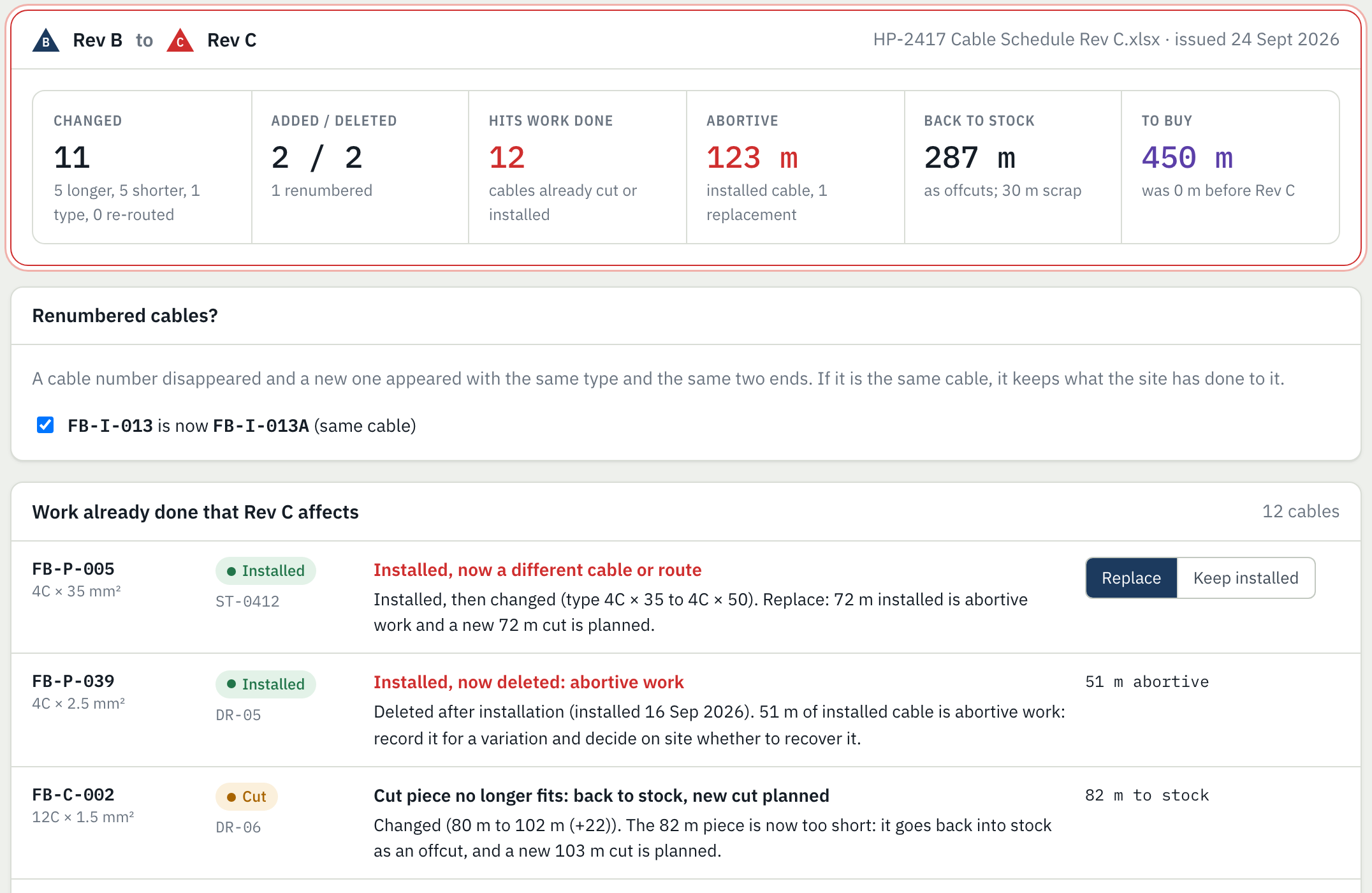
Allocating runs to drums is the easy part, and there are free optimisers for it. The hard part is keeping the plan true after the site has started cutting, when the engineer issues the next revision.
Every run is allocated to a drum, the shortfall is ordered, and drum cards go to the cable crew.
Pieces are cut a metre long, a part drum turns out shorter than its label, some cables are pulled early with a tray section, others are cut and waiting.
An invented water treatment works with realistic data: 99 cables in 8 cable types, 13 drums including part drums and an offcut from another job. When Rev C arrives, 47 cables are installed and 14 are cut and waiting to be pulled.
Rev C relocates a backwash pump, uprates a blower motor, adds a pump, deletes a drain valve, shortens a tray route and renumbers an instrument loop. It changes 16 cables, and 12 of those changes hit work already done.
Drumplan re-plans only what is not cut yet, and keeps runs on the drums the site already has cards for. That moves 3 runs. Re-optimising everything from scratch would move 15 and buy no less cable.
| Order after Rev C | Before | After |
|---|---|---|
| 4C × 95 mm² Cu XLPE/SWA/LSZH | - | 250 m |
| 12C × 1.5 mm² Cu XLPE/SWA/LSZH | - | 100 m |
| 4C × 50 mm² Cu XLPE/SWA/LSZH (new in Rev C) | - | 100 m |
Drop in the consultant's Excel or CSV. Drumplan finds the header under the title block, maps the columns, reads the revision letter and date, and merges the three ways the same cable is spelt.
Import the drum register or store list: full drums, part drums with their balance, loose offcuts, drums on order. Measure a drum and the record follows.
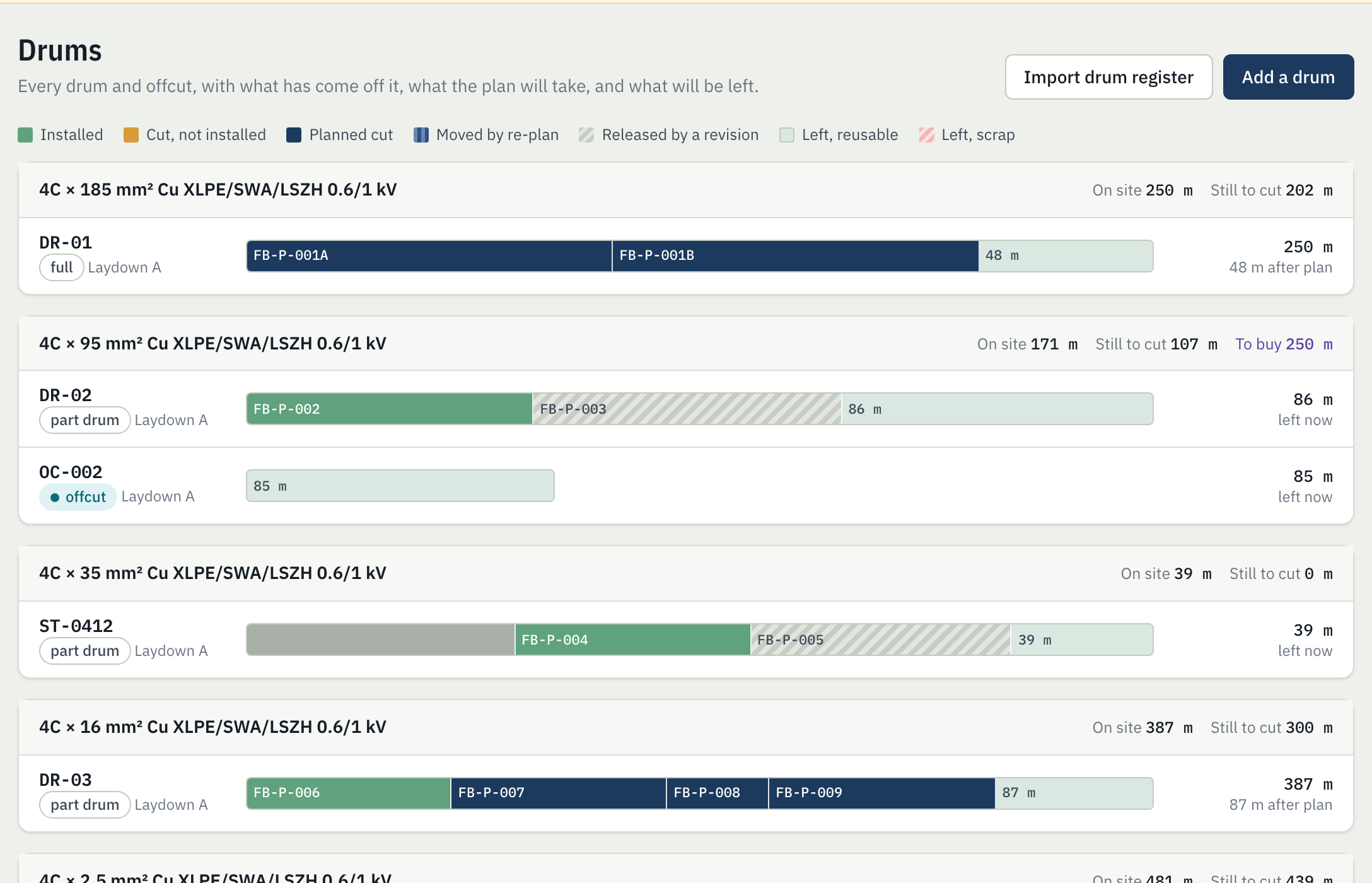
Every run goes to a drum. Part drums and offcuts are used first, leftovers are either about zero or long enough to reuse, and whatever stock cannot cover becomes an order list in standard drum lengths.
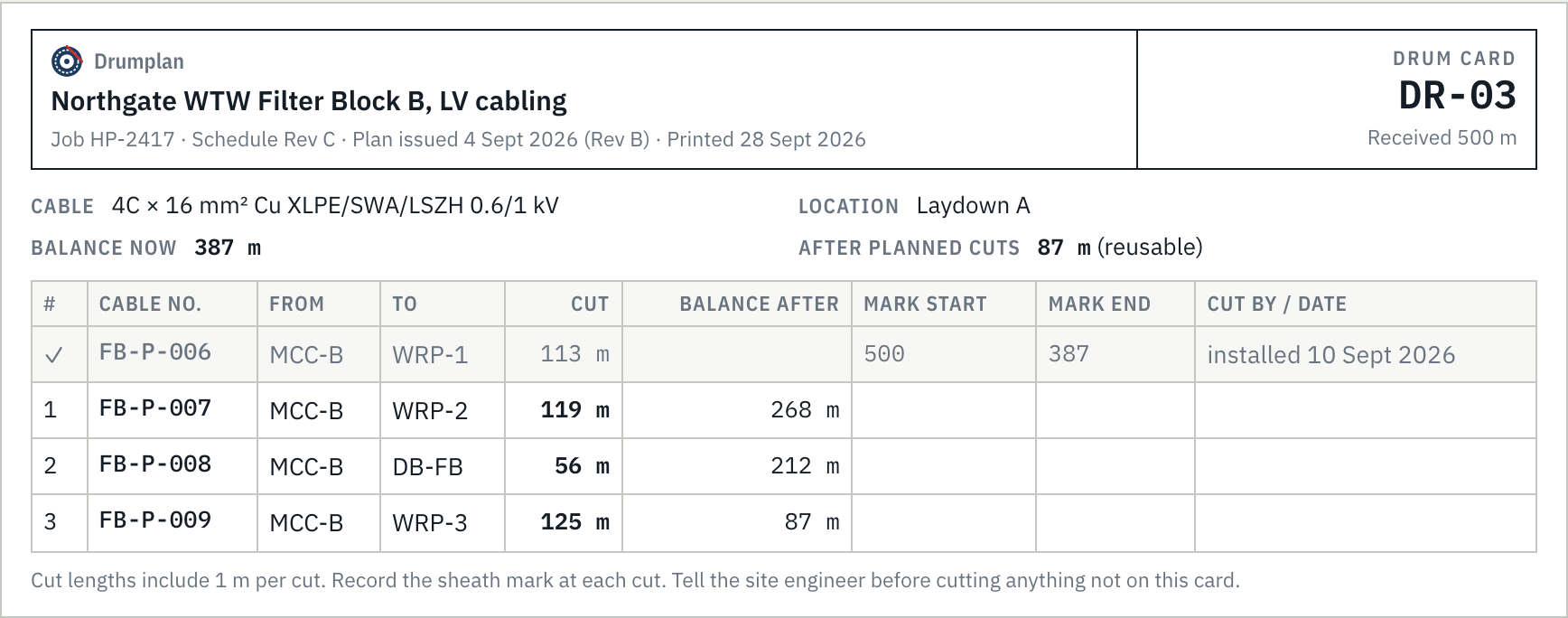
Each drum card lists the cuts in order with the balance after each, and space for the crew to write the sheath marks.
Record cuts one at a time by length or by sheath marks, or, with Pro, import the site's whole pulling record at once. Drum balances come from real cuts, not the plan.
Cut from a different drum than planned? Cut a metre long? Pulled early? Record what happened; the plan for everything still to cut adjusts to the stock actually left.
Import the revised schedule. Before anything changes, Drumplan shows what was added, deleted, lengthened, shortened, re-typed, re-routed or renumbered, and what that means for every cable already cut or installed.
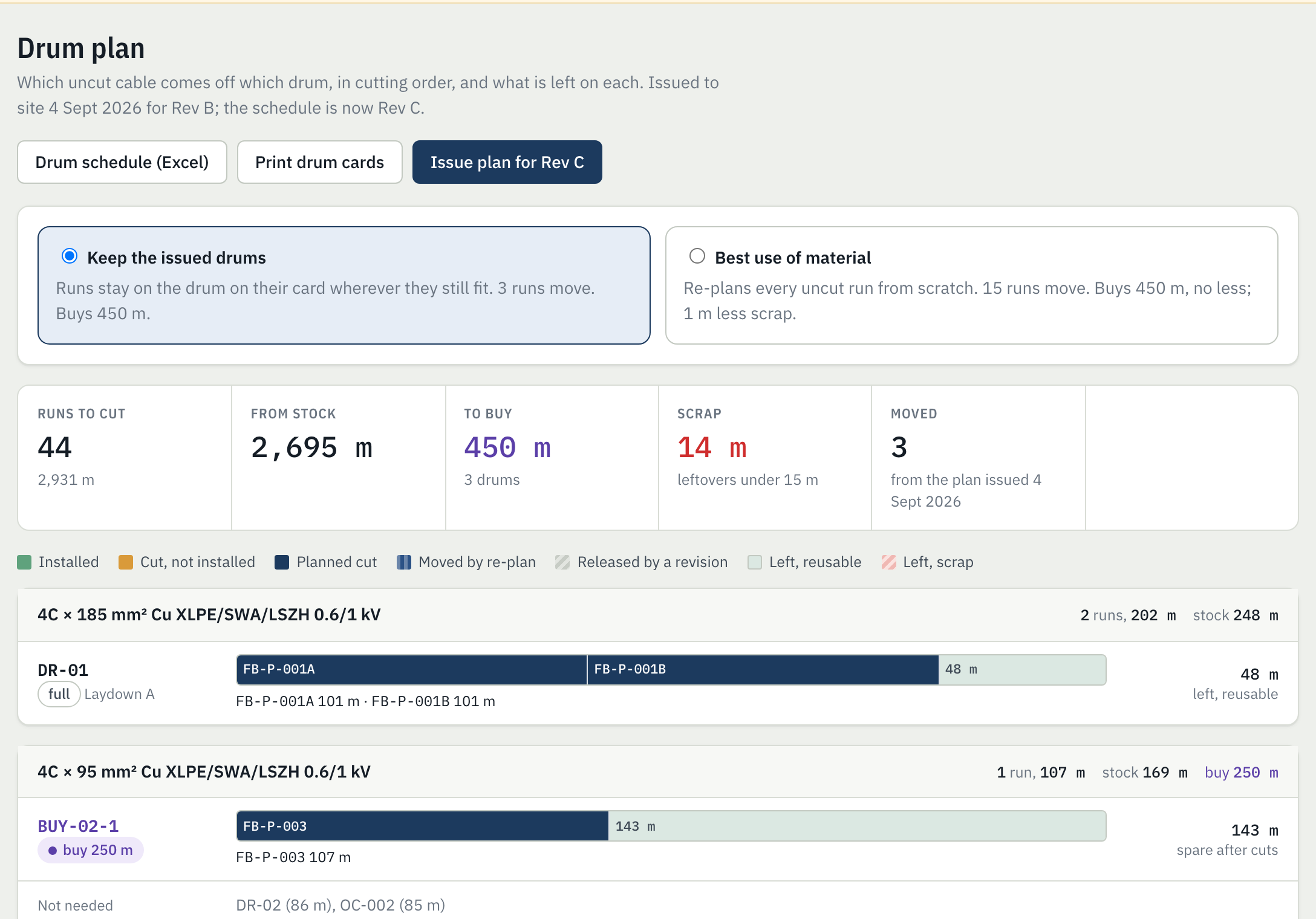
Per drum: cable numbers, cut lengths and balance after each, in the layout drum schedules already use, with the order list.
One per drum for the cable crew. Print only the cards a revision changed.
What changed, the work it hit, abortive cable in metres (and value, if you enter prices), and the order before and after. The record behind a variation claim.
Drums to buy by type and length, with the cables each one is for. Mark it ordered and the plan counts it as stock on the way.
Schedule with status, drum register, drum schedule, orders and the revision log in one file.
Back up the project or hand it to a colleague, who opens it in their browser.
Planning a job is free. Pro adds everything that happens after the first revision arrives.
Pro is not on sale yet. Until it is, every Pro feature is unlocked in the sample project.
Nowhere. Spreadsheets are read in your browser and never uploaded, and projects are saved in the browser on your computer. To back up a project or share it, export the project file from Settings.
Planning is free: importing the schedule and drums, the drum plan, drum cards, the drum schedule and order list, and recording cuts. Pro, which adds revision reconciliation, the abortive work report and pulling record import, will be $49 per user a month or $490 a year. Pro is not on sale yet; until it is, every Pro feature is unlocked in the sample project.
It fills each drum with the combination of runs that fits it best, then improves the whole plan by moving and swapping runs, weighing what must be bought against scrap and against opening a fresh drum. In the test suite it fills a drum exactly whenever an exact fit exists and never plans more onto a drum than it holds. It is a planning aid: the site engineer checks it, and drum cards say to ask before cutting anything not on the card.
You set them: length added to every cut for the pulling end, any percentage on top of schedule lengths, the length kept back on each drum for tolerance, and the shortest offcut worth keeping. Defaults are 1 m per cut, 2 m kept back and 15 m.
If a cable number disappears and a new one appears with the same type and the same two ends, Drumplan asks whether it is the same cable. If it is, the cable keeps what the site has done to it.
Drumplan reads Excel, OpenDocument and CSV. Most PDF schedules export from the consultant's spreadsheet; ask for the native file, or convert the PDF table to Excel first. Reading PDFs directly is not built yet.
Not at the same time yet. One person keeps the project and exports the project file for others. Shared projects need accounts and a server, which Drumplan does not have yet.
Either. Imports read the unit from the column heading, and each project shows lengths in the unit you choose.
Open the sample project, import Rev C, and decide what you would have done. Then try it with your own schedule and drum register.